Social Proof & Marketing Features
From theme version 7.3.0, Supermarket ships with a suite of social-proof and marketing popups: PDP urgency widget, cart-goal progress bar, recent-sales notifications, promotional popup, and exit-intent popup. All features are configured through a single window.supermarketThemeSettings object injected via BigCommerce Script Manager, so merchants can tune behavior without touching theme files.
Overview
| Feature | Default state (production) | Enable method |
|---|---|---|
| PDP Urgency Widget | Disabled | urgency.enabled: true |
| Cart Goal Bar | Disabled | cartGoal.enabled: true + configure items |
| Recent Sales Popup | Disabled | recentSales.enabled: true |
| Promotional Popup | Disabled | promo.enabled: true |
| Exit-Intent Popup | Disabled | exit.enabled: true |
| Newsletter Popup | Configured via Theme Editor | nl_popup_show theme setting (unchanged) |
Inside the BigCommerce theme editor preview panel, any widget you haven't configured in Script Manager renders with demo content so merchants can evaluate the feature before enabling it. See Theme Editor Preview below. Production shoppers always see the defaults above until you opt-in.
Theme Editor Preview
From theme version 7.3.0, the social-proof widgets automatically render with demo content inside the BigCommerce Stencil theme editor preview panel — so merchants can evaluate each widget in the editor without first adding a Script Manager snippet.
Rules:
- Only inside the editor. Detection keys off
window.previewSdk.themeEditor— the Page Builder / theme editor SDK global BigCommerce injects into the storefront iframe when rendering a page in the editor. Production shoppers never see demo content because this global is not present on regular page loads. - Per-feature, only when unset. For each feature (
urgency,cartGoal,recentSales,promo,exit), demo content fills in only when that key is missing fromwindow.supermarketThemeSettings. If you've configured a feature — including explicitly disabling it withenabled: false— the editor preview respects your configuration exactly. - Unknown top-level keys pass through. Any custom keys you add to
window.supermarketThemeSettingsthat are not part of the standard schema are preserved unchanged in both editor and production. - Not a security boundary. This is a best-effort environment check; the only consequence of a false-positive is demo copy being shown. No shopper data, auth, or state is gated on this check.
To preview a specific feature in the editor without shipping it to shoppers, simply do not add a Script Manager snippet for that feature — the demo fills in automatically in the editor and the feature stays off in production. To test an explicit disable, add { urgency: { enabled: false } } etc. to the Script Manager snippet.
Configuration via Script Manager
All settings live in one JavaScript snippet injected through the BigCommerce Script Manager. No schema.json or theme-editor changes are required.
- Log in to BigCommerce Admin.
- Go to Storefront > Script Manager.
- Click Create a Script.
- Set the fields:
- Name of Script:
Papathemes Social Proof - Placement:
Footer - Location on page:
All pages - Select script category:
Essential - Script type:
Script
- Name of Script:
- Paste your snippet (see examples below) wrapped in
<script>tags. - Click Save.
Starter snippet
Copy this as a starting point and adjust per feature. Keys you don't include fall back to the theme defaults.
All features are disabled by default. You only need to include the keys you want to enable.
<script>window.supermarketThemeSettings = {urgency: {enabled: true,viewCount: { min: 8, max: 42 },viewRange: { min: 3, max: 15 },lastOrder: { min: 2, max: 60 },orderRange: { min: 5, max: 30 },refresh: 20000},cartGoal: {enabled: true,currency: 'USD',hideForGuests: false,items: [{ amount: 50, icon: 'shipping', label: 'Free Shipping' },{ amount: 100, icon: 'discount', label: '10% Off' },{ amount: 150, icon: 'gift', label: 'Free Gift' }]},recentSales: {enabled: true,source: 'best-sellers',timing: { delay: 8000, duration: 6000, interval: 20000, maxShows: 3 },position: 'bottom-left',pages: 'all',excludePages: ['/cart.php', '/checkout']},promo: {enabled: true,title: 'Special Offer',description: 'Get 15% off your first order!',coupon: 'WELCOME15',buttonText: 'Copy Code',delay: 10000,freqDays: 7},exit: {enabled: true,mode: 'discount',title: 'Wait! Before you go...',description: 'Here\'s 10% off to help you decide.',coupon: 'STAY10',buttonText: 'Copy Code',buttonUrl: '',mobileDelay: 30000,freqDays: 7}};</script>
PDP Urgency Widget
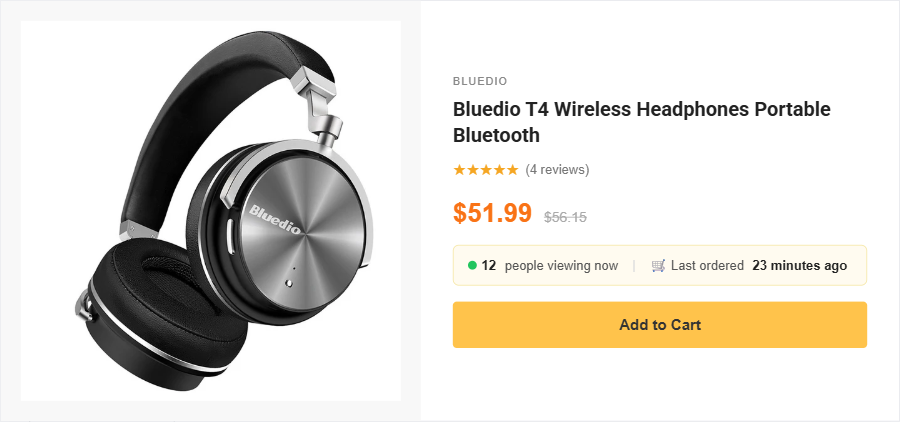
Shows live-like social proof on product pages: "12 people are viewing this" and "Last ordered 8 minutes ago". Numbers are deterministic per product + visitor using a hashed PRNG so repeat views look consistent.
| Key | Type | Default | Description |
|---|---|---|---|
enabled | boolean | false | Master switch |
viewCount | { min, max } | { min: 8, max: 42 } | Range of the viewer count |
viewRange | { min, max } | { min: 3, max: 15 } | How much the count drifts per refresh |
lastOrder | { min, max } | { min: 2, max: 60 } | Minutes since last order |
orderRange | { min, max } | { min: 5, max: 30 } | How much the last-order value drifts per refresh |
refresh | number (ms) | 20000 | Interval at which numbers re-roll |
Disable the widget:
<script>window.supermarketThemeSettings = {urgency: { enabled: false }};</script>
Cart Goal Bar
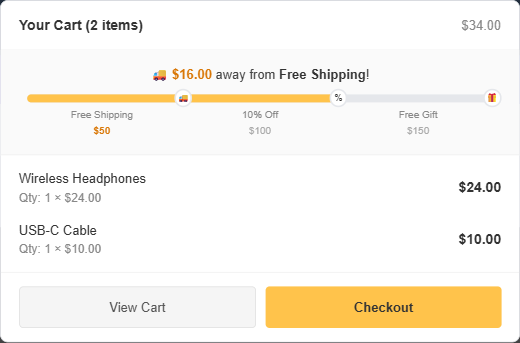
A progress bar on the cart / mini-cart that gamifies reaching checkout thresholds (free shipping, percentage discount, free gift, etc.). Thresholds are display-only — create an actual BigCommerce promotion that matches each milestone so customers actually receive the reward.
| Key | Type | Default | Description |
|---|---|---|---|
enabled | boolean | false | Master switch |
items | array of { amount, icon, label } | [] | Ordered list of milestones |
items[].amount | number | — | Subtotal threshold (in store currency) |
items[].icon | string | check | One of: shipping, discount, gift, check, bag, star |
items[].label | string | — | Text shown next to the icon |
currency | string | store default | ISO currency code used for formatting |
hideForGuests | boolean | false | If true, bar only shows for logged-in customers |
Example — 3-milestone ladder:
<script>window.supermarketThemeSettings = {cartGoal: {enabled: true,currency: 'USD',items: [{ amount: 50, icon: 'shipping', label: 'Free Shipping' },{ amount: 100, icon: 'discount', label: '10% Off' },{ amount: 150, icon: 'gift', label: 'Free Gift' }]}};</script>
Example — single milestone (free shipping only):
<script>window.supermarketThemeSettings = {cartGoal: {enabled: true,items: [{ amount: 75, icon: 'shipping', label: 'Free Shipping' }]}};</script>
Important: Each
amountmust correspond to a real BigCommerce promotion (Marketing > Promotions). The bar only reflects progress visually — it does not create discounts.
Recent Sales Popup

A small popup in the corner of the page saying "Someone in Chicago just bought [Product Name] — 3 minutes ago". Products come from BigCommerce via GraphQL Storefront API.
| Key | Type | Default | Description |
|---|---|---|---|
enabled | boolean | false | Master switch |
source | string | best-sellers | One of: best-sellers, new, featured, manual |
items | array | [] | Required when source: 'manual' — see below |
items[].productId | number | — | BigCommerce product ID (OR use sku) |
items[].sku | string | — | Product SKU (OR use productId) |
items[].location | string | — | e.g. "Chicago, IL" |
items[].timeAgo | string | — | e.g. "3 minutes ago" |
timing.delay | number (ms) | 8000 | Delay before first popup |
timing.duration | number (ms) | 6000 | How long each popup stays visible |
timing.interval | number (ms) | 20000 | Gap between popups |
timing.maxShows | number | 3 | Max popups per session |
position | string | bottom-left | bottom-left or bottom-right |
pages | string | all | all, home, product, category, or none |
excludePages | array of strings | [] | URL paths to skip (e.g. ['/cart.php', '/checkout']) |
Example — manual product list:
<script>window.supermarketThemeSettings = {recentSales: {enabled: true,source: 'manual',items: [{ sku: 'SKU-001', location: 'New York, NY', timeAgo: '2 minutes ago' },{ sku: 'SKU-002', location: 'Los Angeles, CA', timeAgo: '5 minutes ago' },{ sku: 'SKU-003', location: 'Chicago, IL', timeAgo: '12 minutes ago' }],timing: { delay: 5000, duration: 6000, interval: 15000, maxShows: 5 },position: 'bottom-right'}};</script>
Troubleshooting — popup not showing?
- Verify the GraphQL Storefront API token is available — the theme emits a console warning if the token is missing.
- Check browser ad-blockers / privacy extensions — some strip the popup container.
- Confirm the current URL isn't in
excludePagesand thatpagesincludes the current page type. - Clear
sessionStorage— dismissing the popup sets apapathemes_socialproof_recentSales_dismissedkey that suppresses it for the remainder of the session. - Open DevTools and check for
[papathemes-socialproof]warnings.
Promotional Popup
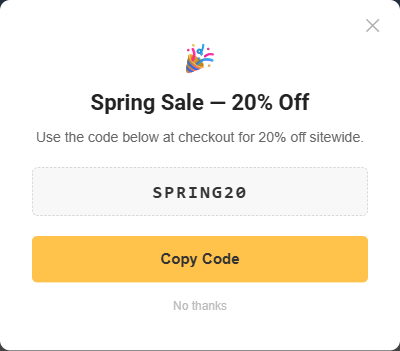
A centered modal advertising a coupon or campaign with click-to-copy of the coupon code.
| Key | Type | Default | Description |
|---|---|---|---|
enabled | boolean | false | Master switch |
title | string | 'Special Offer' | Heading text |
description | string | '' | Body text (plain text or basic HTML) |
coupon | string | '' | Coupon code rendered as a click-to-copy chip |
buttonText | string | 'Copy Code' | CTA label |
buttonUrl | string | '' | Optional URL the button links to instead of copying |
delay | number (ms) | 10000 | Delay before popup appears |
freqDays | number | 7 | Dismissal cool-down period |
Example:
<script>window.supermarketThemeSettings = {promo: {enabled: true,title: 'Spring Sale - 20% Off',description: 'Use the code below at checkout for 20% off sitewide.',coupon: 'SPRING20',buttonText: 'Copy Code',delay: 8000,freqDays: 14}};</script>
Exit-Intent Popup
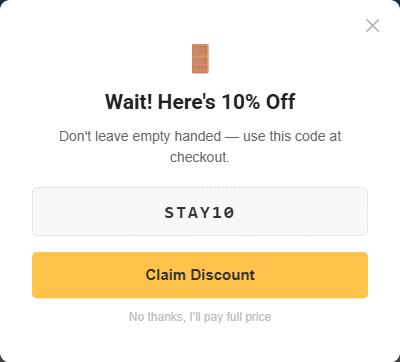
Appears when the user is about to leave the page. On desktop, the trigger is the mouse moving out the top of the viewport. On mobile, since there is no mouse-leave event, the trigger is mobileDelay ms of user inactivity (no scroll / no tap).
| Key | Type | Default | Description |
|---|---|---|---|
enabled | boolean | false | Master switch |
mode | string | 'discount' | 'discount', 'newsletter', or 'custom' |
title | string | 'Wait! Before you go...' | Heading text |
description | string | '' | Body text |
coupon | string | '' | Shown when mode: 'discount' |
buttonText | string | 'Copy Code' | CTA label |
buttonUrl | string | '' | URL the button links to (overrides copy behavior) |
mobileDelay | number (ms) | 30000 | Mobile inactivity threshold |
freqDays | number | 7 | Dismissal cool-down period |
Example:
<script>window.supermarketThemeSettings = {exit: {enabled: true,mode: 'discount',title: 'Wait! Here\'s 10% off',description: 'Don\'t leave empty handed — use this code at checkout.',coupon: 'STAY10',buttonText: 'Copy Code',mobileDelay: 30000,freqDays: 7}};</script>
Newsletter Popup
The existing Newsletter popup is unchanged — all theme-editor settings (nl_popup_show, nl_popup_start, nl_popup_hide) and the NL_POPUP_HIDE cookie continue to work as before.
From theme 7.3.0 onward, the newsletter popup is coordinated with the new social-proof popups through a priority queue so only one popup is shown at a time. The queue order (highest priority first) is: Exit Intent > Promo > Newsletter > Recent Sales. No configuration is required to enable this — it kicks in automatically when the new popups are active.
Disable All
All features are disabled by default — no Script Manager snippet is needed if you don't want any social-proof widgets. If you previously had a snippet that enabled some features and want to revert, either remove the snippet or explicitly disable each feature:
<script>window.supermarketThemeSettings = {urgency: { enabled: false },cartGoal: { enabled: false },recentSales: { enabled: false },promo: { enabled: false },exit: { enabled: false }};</script>
Debugging
- Open DevTools console and run
console.log(window.supermarketThemeSettings)to confirm your snippet loaded and merged correctly. - Check the console for warnings prefixed with
[papathemes-socialproof]— they indicate missing tokens, invalid config, or GraphQL errors. - Open the Network tab and filter for
graphqlto diagnose failed Storefront API calls (typical forrecentSaleswithsource: 'best-sellers' | 'new' | 'featured'). - Inspect sessionStorage and localStorage under Application in DevTools — look for
papathemes_socialproof_*keys. Delete them to reset dismiss state while testing. - Confirm the bundle loaded:
window.__papathemesSocialproofActive === truein the console. If it isundefined, the theme-bundle has not initialized the module (most likely a cached legacy bundle — hard-reload the page).